
New Feature: Manage Fleet Expenses, Faults, and Services On-the-Go with Fleet360 Mobile App
- Emmanuel Eniabiire

- Jul 17, 2025
- 3 min read
Updated: Jul 18, 2025
Overview of the Feature Fleet360 is your comprehensive fleet management solution that helps businesses track, monitor, and optimize their vehicle operations. Our mobile app puts powerful fleet management tools right in your pocket, making it easier than ever to stay on top of your fleet's performance.
Purpose
Managing fleet records shouldn't require you to be back at the office with spreadsheets and paperwork. Fleet managers and companies need a simple way to track expenses, document vehicle issues, and record maintenance activities while on the go. This new Records Management feature eliminates the hassle of manual record-keeping and ensures nothing falls through the cracks.
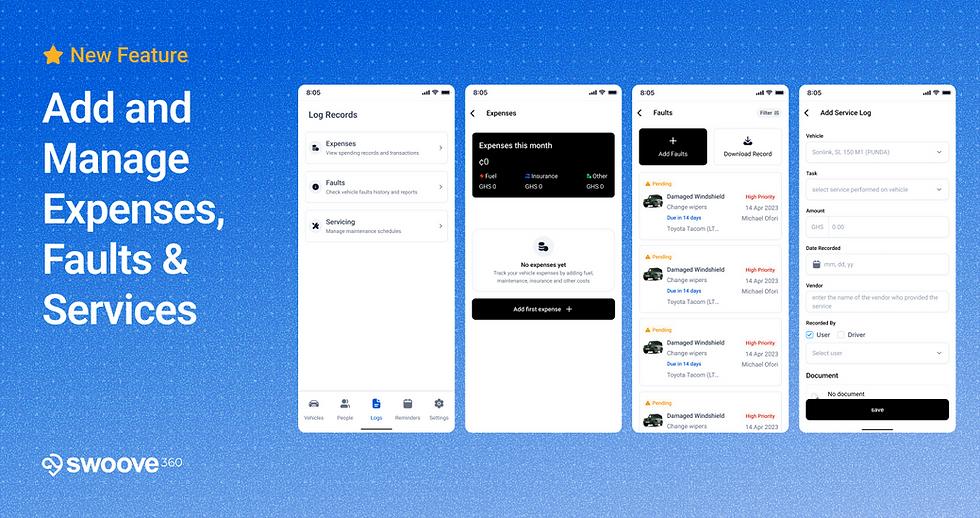
What's New in This Release
Introducing a powerful update to your Fleet360 mobile app! You can now easily add and manage all your fleet's expenses, reported faults, and service logs directly from your smartphone.
This comprehensive update brings a new level of convenience, allowing you to:
Record Expenses Instantly: Log fuel costs, insurance payments, and other operational expenses as they happen.
Document Faults Quickly: Report vehicle issues or damages on the spot, including details and even attaching documents or photos.
Track Service History: Keep a detailed record of all maintenance and service performed on each vehicle.
View All Logs: Access a complete history of all recorded expenses, faults, and services for better insights.
Edit and Delete Entries: Easily correct or remove any past entries if needed.
Steps to Follow to Use the Feature
Getting Started with Records Management
Open the Fleet360 App: Launch the Fleet360 application on your smartphone.
Navigate to "Log Records": On the navigation menu, tap on "Log Records" (you might see an icon representing a document or list).
Choose Your Log Type: You'll see options for "Expenses," "Faults," and "Servicing." Tap on the one you wish to manage.
Adding Expenses
Select "Expenses" from the records menu
Tap "Add first expense" or the "+" button
Choose your expense category (Fuel, Insurance, Other)
Enter the amount and date
Add any additional notes
Save your entry
Recording Faults
Go to "Faults" section
Tap "Add Faults" or the "+" button
Select the affected vehicle
Describe the issue (e.g., "Damaged Windshield")
Set the priority level
Add timeline information
Assign to the appropriate person
Save the fault record
Logging Services
Navigate to "Servicing" section
Tap "Add Service Log"
Select the vehicle from the dropdown
Choose the type of service performed
Enter the cost amount
Set the service date
Specify who recorded it (User or Driver)
Add any supporting documentation
Save the service log
4. View, Edit, or Delete Logs:
From the "Expenses," "Faults," or "Servicing" screens, you can scroll through all recorded logs.
To edit an entry, tap on it. Make your changes and tap "Save."
To delete an entry, tap on the entry to find a "Delete" option.
End-User Impact: Unprecedented Mobile Control and Oversight
This update empowers fleet managers and companies with unparalleled control and visibility, right from their fingertips:
Real-time Data Entry: Record information instantly, reducing delays and improving data accuracy.
Better Cost Control: Easily track all expenses, helping you identify spending patterns and manage your budget more effectively.
Proactive Maintenance: Quickly log faults and service needs, ensuring timely repairs and minimizing vehicle downtime.
Improved Record-Keeping: Maintain comprehensive and easily accessible digital records for all vehicle-related activities.
Increased Productivity: Manage essential tasks while on the go, without needing to return to the office.
We are excited for you to experience the enhanced control and convenience this new feature brings to your fleet management with the Fleet360 mobile app!


Comments